Understanding FTP, CP & W′ — and how TrackIQ builds a faster performance strategy from them
👉 You can find more details about TrackIQ here
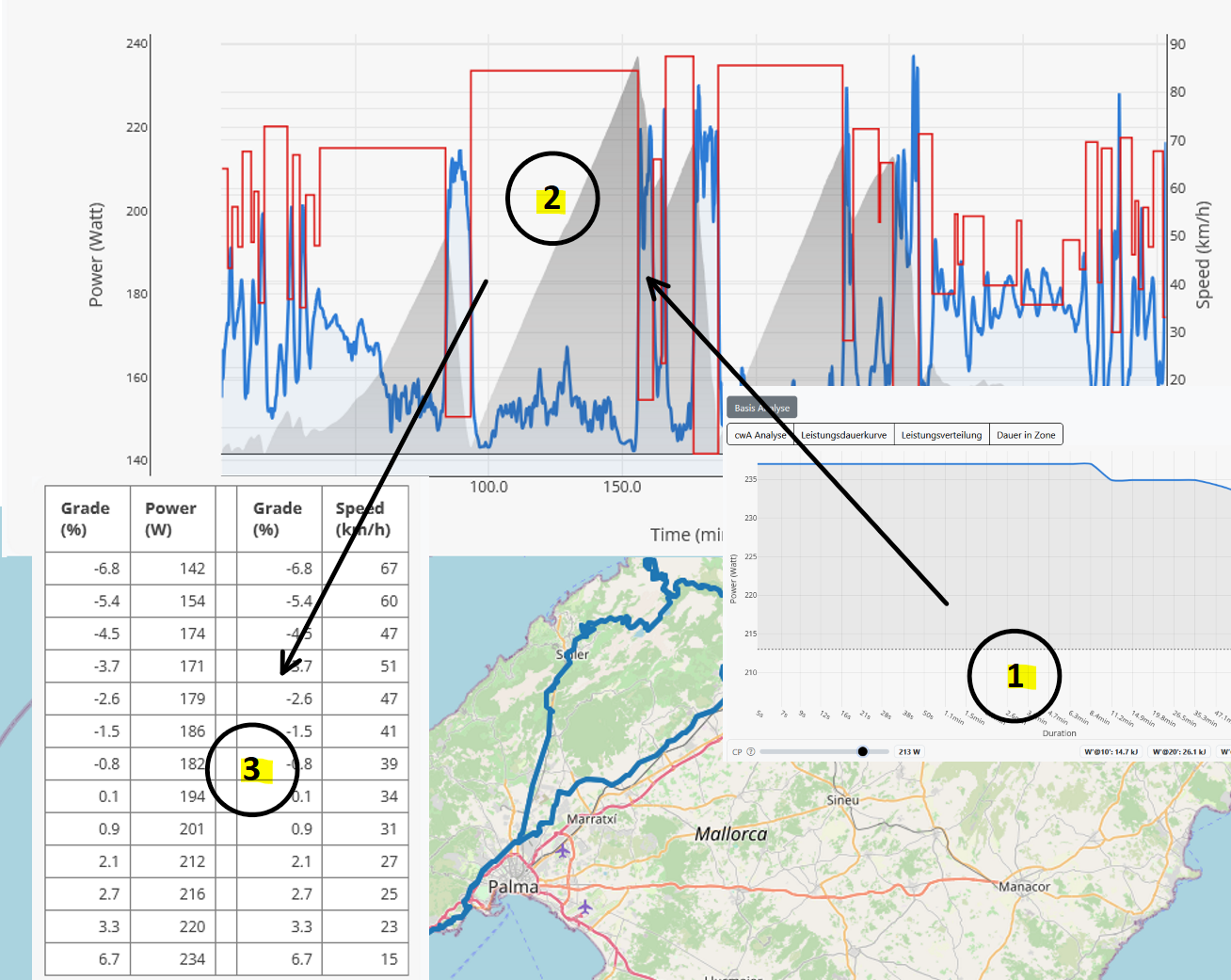
TrackIQ answers a question that keeps coming up in time trials, triathlon, and on hilly cycling courses: How do I distribute my power along the route so I go faster — without riding “harder” overall?
In short: TrackIQ computes a pacing strategy that minimizes your finishing time at the same weighted power (WP). Instead of riding at a constant output, TrackIQ leverages the course’s physical differences so you apply power where it saves the most time.
To keep the result not only “fast on paper” but also rideable, it helps to take a quick look at three terms that show up constantly in endurance sports: FTP, CP, and W′.
FTP (Functional Threshold Power) is the familiar training metric: the power you can sustain for a long time at a very hard but controlled effort (often used as an “approximate one-hour power”). Many determine it via a 20-minute test (avg power × 0.95), ramp tests, or lab diagnostics.
For race strategy and managing surges, two other metrics are especially interesting: CP (Critical Power) and W′ (W Prime). CP is a model-based “durable power” metric derived from the power–duration relationship. W′ is the corresponding anaerobic reserve — the “extra work” you can produce above CP before things get very costly. In simple terms: CP is the line you can hold steadily for longer, and W′ is the battery for hard efforts above it.
This concept maps perfectly onto what happens on real courses: power is not equally effective everywhere. Gradient, rolling resistance, and aerodynamics mean that an extra watt uphill often saves far more time than at very high speeds on flat terrain or downhill. That’s why TrackIQ replaces “ride evenly” with “distribute strategically.”
To do that, TrackIQ breaks the route into sections with similar conditions and proposes power targets that reflect those differences: more power where it saves a lot of time, and deliberate restraint where additional watts bring little benefit. The outcome is a segment-by-segment pacing plan with controlled peaks and recoveries — and in many cases meaningful time gains are possible purely through better distribution.
To prevent this from turning into an unrealistic all-out profile, the target load is controlled through intuitive parameters:
- Intensity ratio (%): sets how high the intended average load may be relative to the rider’s threshold power.
- Max. threshold power (%): limits how large individual power spikes are allowed to be.
- Over-threshold budget (optional): further limits how “spiky” the strategy may become above threshold (e.g., more run-friendly for triathlon).
The key point: at its core, TrackIQ is built around CP/W′ thinking. As soon as you place targeted surges on “fast” parts of the course (e.g., climbs), you want to understand and constrain how much total time you spend above sustainable power — and how big your “budget” for that is.
Estimating CP & W′ in RaceYourTrack (Advanced Analysis)
If you want to derive your threshold (FTP/CP) and your budget from real data, the best approach is: upload a race or training activity recorded with a power meter. In the analysis, you’ll find the relevant values in Advanced Analysis under the Performance Duration Curve.
Here’s how:
- Upload: Upload an activity/race with power meter data.
- Simulation: Run a simulation with power (e.g., “fromRoute”).
- Open the analysis and switch to Advanced Analysis.
- Open the Performance Duration Curve.
- There you can derive threshold power and read/estimate the budget (via a CP/W′ estimate).
Advanced Analysis offers a very intuitive method: you place a CP line on the power–duration curve using a slider. Then W′@10/20/30 min shows how much “additional work” you produced above CP in that time window (derived from the curve).
How to interpret it:
- Higher CP → smaller W′ values
- Lower CP → larger W′ values
- If the values (e.g., W′@10/20/30) are similar, the CP line is often a good fit.
Note: This is a practical estimate from your power curve (not a precisely measured W′) — but extremely useful for getting a workable CP/W′ set for strategy and simulation.
FAQ
Do I even need FTP if TrackIQ uses CP/W′? Not necessarily — but FTP is often the quickest, most robust training number. For strategy (surges + budget), CP/W′ is usually more informative. Many use FTP for zones and CP/W′ for pacing.
Is W′ a fixed value? W′ is model-based and can vary with fitness, fatigue, temperature, fueling, and measurement quality. As a “budget estimate,” it’s still very helpful for keeping spiky strategies realistic.
Why are W′@10/20/30 min sometimes different? Because CP/W′ is estimated here from the power–duration curve. If the values are similar, that’s a good sign the chosen CP line is plausible.
What does TrackIQ add if I already pace by feel? TrackIQ makes it visible where “one more watt” truly saves time — and where you can save watts without losing much time. The result is often faster even though overall load (WP) doesn’t increase.
How do I prevent the strategy from being too hard for triathlon (run) performance? Use the optional Over-threshold budget to further cap power spikes above threshold — for a more run-friendly distribution.
👉 Background & details about TrackIQ can be found here