From TrackIQ pacing to your device: FIT export for Garmin® Edge & ZWO workouts for Zwift®/MyWhoosh® etc.
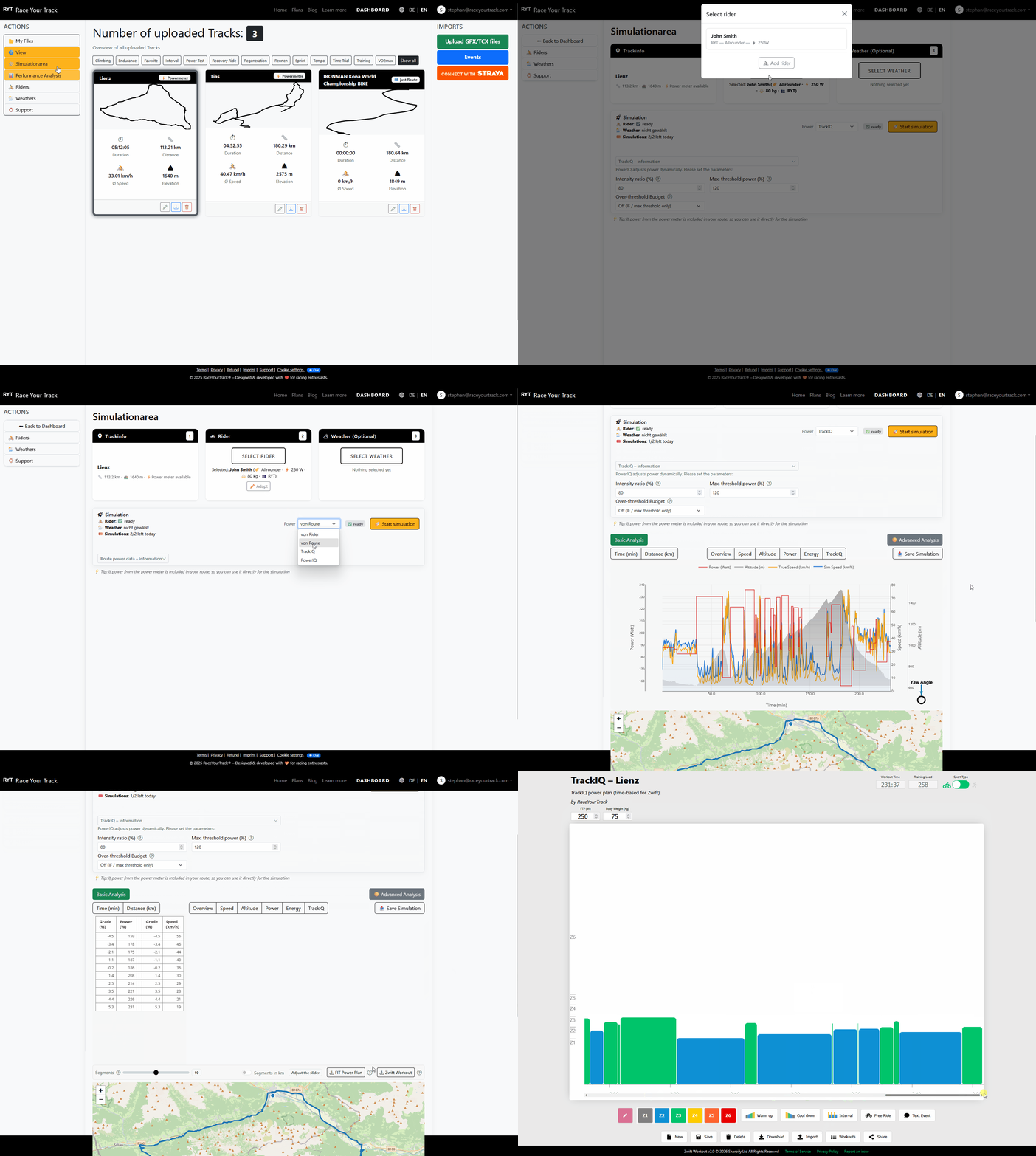
From TrackIQ pacing to your device: turning strategy into a workout you can actually ride
A pacing strategy is only truly useful if you can actually ride it on the road or on the trainer—without staring at spreadsheets or improvising in the middle of a race.
That is exactly what the export is for: TrackIQ calculates a segment-based, physically consistent power distribution for you, and then converts it into a format that bike computers and indoor platforms can read as a workout.
In this article, we will look at two typical targets:
- FIT for structured workouts on a bike computer (for example, a Garmin Edge)
- ZWO (Zwift Workout Format) for indoor platforms and workout editors (for example, Zwift Workout Builder or MyWhoosh Workout Builder)
One important note up front: the tool landscape keeps evolving. Sometimes a web editor is the fastest path, sometimes a sync workflow through a training platform is more convenient. What matters most is not the exact tool, but the outcome: a FIT or ZWO export that your bike computer or indoor platform can reliably understand. And there are now plenty of ways to get there—some built in directly, others through proven intermediate steps.
Step 1: Get the course—from GPX/TCX or directly from the race database
The starting point is always the course. In RaceYourTrack, you can load it in two ways:
If you already have a file, you can import it as GPX/TCX. Alternatively, you can choose a route directly from the event/route database (for example, IRONMAN® courses).
Once the course is loaded, the foundation is there: elevation profile and segmentation.
Step 2: Run TrackIQ—and make the strategy realistically rideable
TrackIQ solves a very specific problem: the same watts everywhere are rarely optimal. An extra watt often saves much more time on climbs or into a headwind than it does at very high speed on flat terrain or downhill. TrackIQ uses exactly that physics and distributes power so that ride time is minimized—without letting total strain spiral out of control.
To make sure the result is not just “fast on paper,” but also realistically rideable, the strategy is controlled through clear limits:
- Intensity ratio (%): how high the target effort is allowed to be relative to threshold power (FTP)
- Maximum threshold power (%): how strongly power spikes are capped
Depending on your setup—and optional extra rules such as spike or budget logic—the result is typically a profile that looks like this: invest more power where seconds are “cheap” to gain (climbs, headwind), and save deliberately where extra watts add very little benefit.
Step 3: Turn the pacing plan into a workout
The TrackIQ output is segment-based. For devices and platforms to work with it, that segment logic has to be translated into structured workout steps.
In practice, that means many small course sections are converted into workout blocks you can actually ride well (for example, 30–120 seconds per block, depending on the character of the route). Smoothing makes sure the power does not jump around in a nervous way.
The goal is not to represent every tiny bump in the road as its own step, but to create a structure that:
- preserves the physical logic,
- stays readable on the device,
- and feels smooth and rideable on the trainer.
FIT export: ride structured workouts on a Garmin Edge
A FIT workout is, in simplified terms, a structured training session your bike computer can display as a guided workout: target watts, duration, and upcoming steps.
On many devices, the classic workflow is simple: you copy the FIT file to the device. The next time it starts up, the bike computer imports the workout and moves it into its internal workout library.
What you can expect outdoors is a clear execution flow: you see the target ranges, get prompts for the next section, and can ride the strategy without constantly having to interpret it yourself.
ZWO export: use TrackIQ as a Zwift or MyWhoosh workout
ZWO is the natural format for indoor workouts because Zwift and many editors/platforms support it.
For Zwift, the typical workflow is: place the ZWO file in the “Workouts” folder of your Zwift account, restart Zwift, and the workout will appear under your custom workouts.
For MyWhoosh, the principle is similar, but often even more convenient from a workflow standpoint: using the web-based workout builder, you can upload ZWO files, review them, and then add them to your MyWhoosh workout library.
And if you want to fine-tune the result—labels, merging steps, warm-up/cool-down, or small edits—web editors such as zwiftworkout.com or the MyWhoosh Builder can help. There, you can also shorten the workout if needed (for example, by merging or removing blocks) and, depending on the tool, adjust intensities through FTP/threshold scaling if you want to match the session to a different fitness level or a specific target FTP. Which interface you use is mostly a matter of preference—the key point is this: TrackIQ provides the logic, and the editor makes it look and feel right for the platform.
The big advantage: a strategy you can actually follow
Most pacing mistakes do not happen because someone “doesn’t know enough.” They happen because, in the moment, everything is happening at once: wind, grade, race dynamics, and how you are feeling that day.
An exported workout removes exactly the part that costs the most mental energy in training and racing: constantly deciding whether your current watts make sense.
You are no longer riding the course by feel with some vague idea of “steady power.” You are following a strategy that already accounts for the most important physical reality:
One watt is not worth the same amount everywhere.
These articles might also interest you:
- 10 Watts More or 10 lb Less: What Actually Makes You Faster on the Ironman Bike Course? — 03.06.2026
- Why am I not getting faster on the bike? Weight, watts, tires and aerodynamics explained simply — 09.05.2026
- TrackIQ Power Strategy: How Simulation Reveals Where Your Watts Really Make You Faster — 25.10.2025
- Master Your Race Day with RaceYourTrack — 24.10.2025