Identifying Air Resistance (CdA) on Your Course: How RaceYourTrack Reveals Your Biggest Aero Levers
You’ve dialed in your aero helmet, tight race kit, and aggressive position—yet your bike split on your target Ironman course still falls short of expectations. Your power meter numbers are solid, your gear is considered fast, but somewhere on the course you’re losing crucial seconds. This is the dilemma for many ambitious age-group triathletes: How do you find out if—and where—air resistance is really limiting you, and how can you pinpoint the biggest aero lever on your specific course?
Athlete Dilemma: When Aero Setup and Power Are Right, But the Bike Split Isn’t
Many triathletes invest time and budget into aerodynamics, equipment, and training. Still, their bike split on race day doesn’t match their expectations. The power numbers are there, the setup checks all the boxes, but simulation—or gut feeling—says there should be more speed. Uncertainty grows: Is it the wind, your position, subtle setup details, or the course itself? The key question: Where is air resistance really limiting you, and how can you make this visible using your own data?
Common Pitfall: Why Generic CdA Values and Forum Comparisons Fall Short
It’s tempting to benchmark against typical CdA values from forums or wind tunnel tests—like “0.22 is fast, 0.28 is average.” But these numbers ignore crucial factors: course profile, wind, position, even day-to-day form. A seemingly good CdA can lose value on a flat course like Hamburg if there’s a crosswind or you lose your position for a moment. On a hilly course, such as Nice, the impact of air resistance shifts: weight dominates on steep climbs, CdA on fast flats. Only when you know which sections of your course are most limited by air resistance can you optimize effectively. Generic advice like “more aero is always better” misses the point, because it doesn’t show where on your course the biggest gains are actually possible.
For more on the physics and resistance mix, see Why Am I Not Getting Faster on the Bike? Weight, Power, Tires, and Aerodynamics Explained.
The Mechanics: How RaceYourTrack Analyzes Air Resistance Using Power Meter Data
RaceYourTrack uses an advanced version of the Chung method to estimate a practical average CdA for your real course, based on your power meter, GPS, and elevation data. The core formula for air resistance force is:
$$ F_{air} = 0.5 \times C_dA \times v^2 \times \rho $$
Where $C_dA$ is your drag coefficient times frontal area, $v$ is speed, and $\rho$ is air density. Air resistance force increases with the square of your speed—and its impact varies across the course depending on speed, wind, and profile.
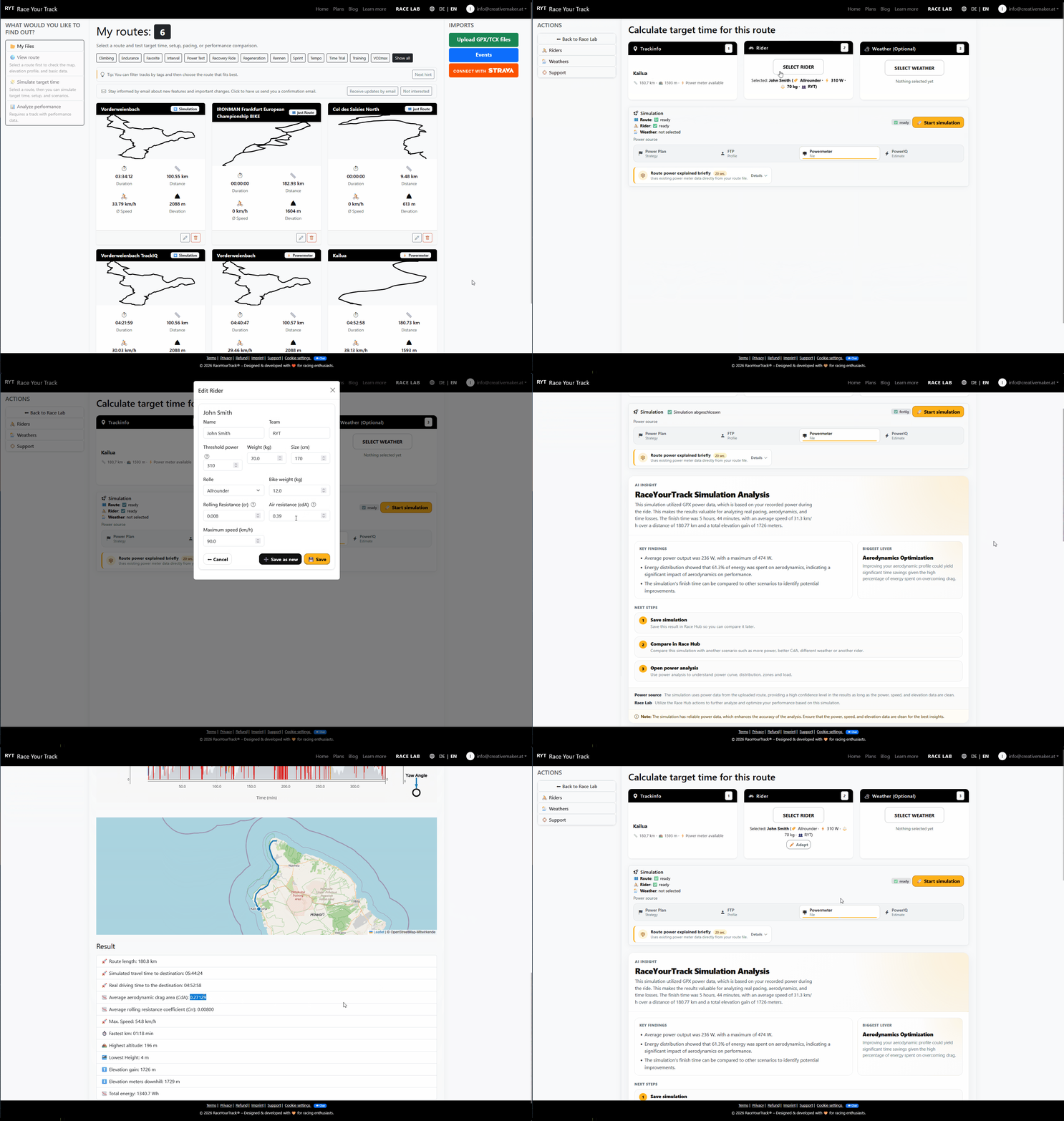
With RaceYourTrack, you import your GPX, TCX file and get a robust estimate of your average CdA from your real ride data. This requires a well-calibrated power meter and as steady conditions as possible during your test ride. You can enter this CdA value directly into your Rider Profile and use it for further simulations. This makes it visible how your real-world setup performs on your actual course—not just in the lab, but under race conditions.
If you want to dive deeper into the methodology, see Calculating CdA from Power Meter Data: The Advanced Chung Method by RaceYourTrack.
Scenario Comparison: What Differences Between Simulation and Measurement Mean
With your updated CdA in the Rider Profile, you can simulate how your setup behaves on your course. Comparing measured and simulated speed gives you clues about where your assumptions about CdA and wind are reasonable—and where there’s room for improvement.
- If measured and simulated speeds match closely over long stretches, your assumptions about CdA and wind are likely accurate.
- If there are significant differences, there are usually three main causes:
- Wind: A sudden drop in measured speed on an exposed section, despite steady power, often points to a gust. For example, after a turn into an open field, your measured speed drops but the simulation suggests your CdA should be fine—wind is the likely culprit.
- Setup or Position Changes: After an aid station, you might be sitting less compact or your clothing could be flapping. The analysis shows a higher CdA—likely due to position loss or equipment change.
- Measurement Errors: GPS or power meter inaccuracies can skew individual data points, especially on short sections. Repeating rides or doing plausibility checks helps identify these effects.
This analysis makes it clear where air resistance dominates, and where other resistances (like gradient or rolling resistance) matter more. How Does Air Resistance Affect Cycling? Power, Resistance, and Performance Shares deepens your understanding of resistance mix on different course profiles.
Decision: Pinpoint and Simulate Your Biggest Aero Lever
With your average CdA from power meter data, you can use the Rider Profile to simulate different setups and see how changes in CdA, weight, or equipment affect your speed. Even small tweaks—like a new suit or helmet—become understandable if your power meter data is clean.
Here’s an example overview of typical CdA values and corresponding setups (for orientation only, not a universal prediction):
- Time trial bike, aero helmet, tight clothing: 0.21 – 0.24
- Road bike, aggressive position: 0.26 – 0.30
- Road bike, upright position: 0.32 – 0.36
- Flapping clothing, poor position: >0.36
The closer you get to the lower end, the harder further improvements become—and the more important it is to analyze carefully so you don’t chase the wrong levers. The biggest aero gains are often in position, clothing, and helmet. Gear like a disc wheel or aero bottles can offer smaller but measurable effects—depending on your course and speed.
Key factors to keep in mind:
- CdA (Aerodynamics): Has the strongest effect on fast, flat sections.
- Weight: Crucial on steep climbs, less relevant on fast flats.
- Power: Your absolute wattage determines how much resistance you can overcome.
- Course profile: Flat, rolling, or hilly—the dominant resistance changes.
- Wind: Can skew your analysis if not properly accounted for.
- Pacing: How you distribute your power affects where aero optimization matters most.
A practical example: You determine your average CdA on your target course and enter it in your Rider Profile. Then you simulate two setups—one with your current helmet, one with a new aero helmet. The simulation shows that on fast, flat sections, the new helmet provides a measurable benefit, while on climbs, weight is more important. This helps you decide if the investment makes sense for your course.
If you want to see how changes in CdA, weight, or power affect your speed, try the Power ↔ Speed Calculator: Identify the Key Levers on Your Course.
In the Rider Profile, you can simulate and compare different setups to see how changes affect your own course. This is how you find the biggest aero lever for your target time.
Conclusion: Simulation as a Decision Tool for Targeted Aero Optimization
Only a data-driven analysis using power meter data and simulation makes it visible where air resistance is truly limiting you on your course—and where setup, wind, or pacing make the difference. The decision formula: Identify the sections where air resistance makes up the largest share of the required power. Simulate different setup changes for those sections and check which option has the biggest impact on your target time. This way, you invest your resources where they’ll have the greatest effect—data-driven, transparent, and tailored to your course.